An AI agent that orders stock for a small café within the owner’s budget and rules, built in three hours at the Briefcase × Stripe hackathon in London.
01Summary
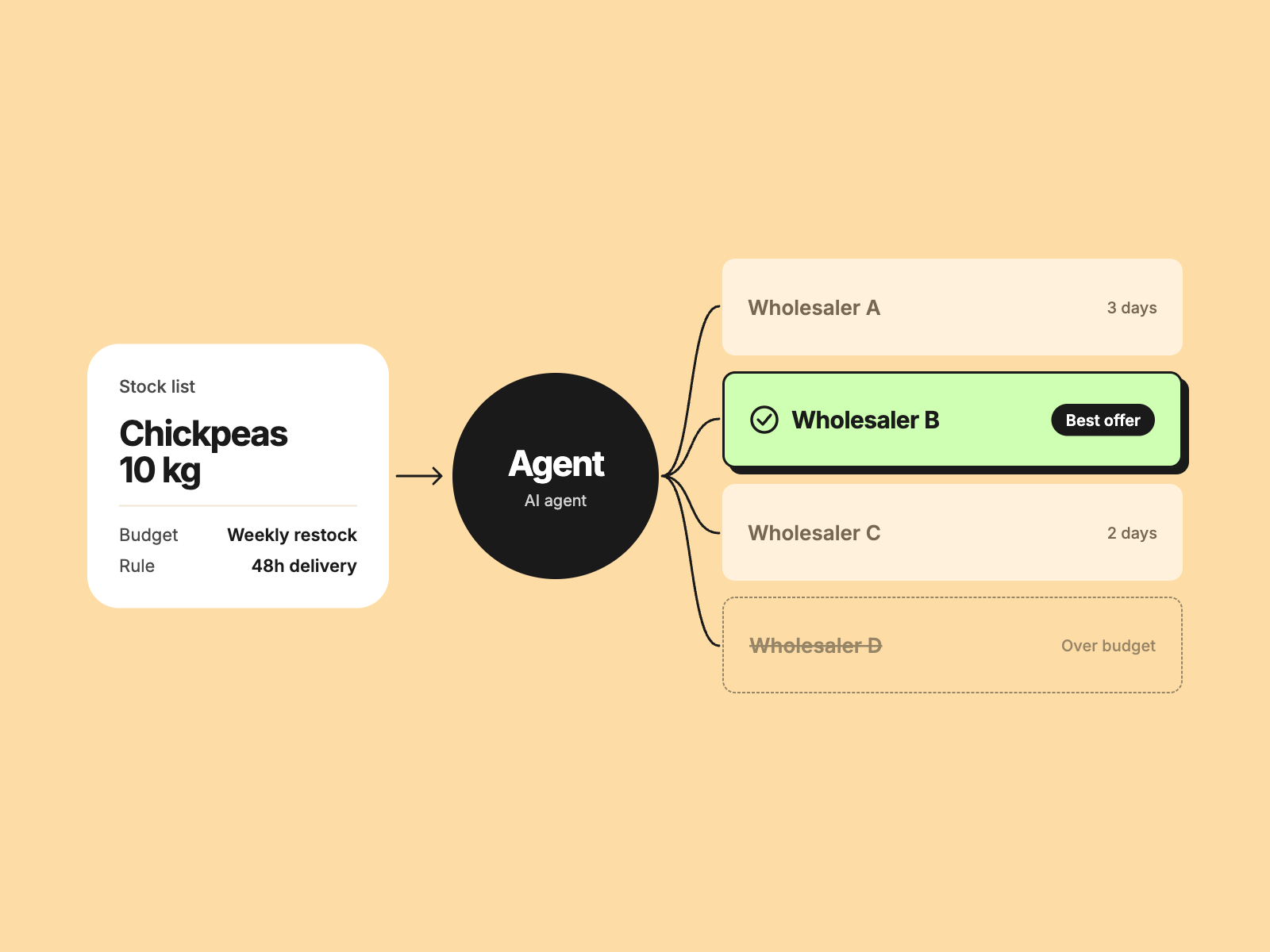
Hummus is an AI purchasing agent for small cafés. The owner types or uploads a stock list and sets a budget. The agent works out what to buy, compares suppliers and shows the best deals. Nothing is bought until the owner approves, and then payment moves through Stripe in test mode.
We built it in three hours at the Briefcase × Stripe hackathon in London and finished 3rd. I was the UI and product designer on the team.
02Problem & Context
The brief
The hackathon asked teams to build an agent that spends or collects money in Stripe test mode. We picked the "Agents that spend" track: an agent that pays under a written policy and can explain every pound.
The user
A café owner who orders stock by hand, from memory or from spreadsheets, and checks prices supplier by supplier.
Why it mattered
An agent that spends money has to earn trust. The owner needs to see what it plans to buy, why, and within which limits, before anything is paid.
03Approach
There was no time for research, so the design followed the brief and the judging criteria. The question was how to make an autonomous agent feel safe to hand a budget to.
Three principles guided the interface:
- The owner stays in charge. Nothing is bought without approval.
- The rules are visible. Limits and approvals are part of the flow, not hidden behind it.
- Waiting is part of the experience. Every step shows progress, so the agent never looks stuck.
04Key Decisions & Tradeoffs
Decision 1: A four-step flow
Your stock, Check the list, Review deals, Approve & pay. Each step does one job, so the owner always knows where they are and what happens next.
Decision 2: Budgets from existing buckets
Instead of typing an amount, the owner can pick a money bucket such as Weekly restock or Rainy day, each showing what is left. Typing a custom amount is still possible.
Decision 3: Fewer words on screen
The first version explained too much on every page. I cut the copy so the flow reads at a glance, which mattered for a two-minute demo.
Decision 4: Make waiting playful
The agent takes time to read lists and search suppliers. A determinate progress bar with light-hearted taglines, and a hummus bowl animation, turn that wait into part of the product's personality.
05Solution
Your stock
Type a list or upload a spreadsheet. Dropping a file shows loading progress straight away.
Budget and buckets
A budget card matches the width of the list above it, opens by default, and lets the owner choose a bucket or enter an amount.
Review deals
The agent compares suppliers and shows the best deals, with a stepped progress bar while it searches.
Approve and pay
Behind the interface, a rules engine checks every purchase against the owner's written policy, and Cognee memory lets the owner ask why the agent bought or skipped an item. Payment goes through Stripe in test mode.
06Reflection & Next Steps
What I'd do differently
With more time I would test the flow with real café owners before designing it, and design the "ask why" answers as carefully as the ordering steps.
Where this goes next
Connecting real suppliers and bank balances, and letting the owner write and edit their own purchasing rules.